See what moves the market. On one chart.
PrimeScope counts the Elliott Waves for you, scans your watchlist for setups and shows where large orders wait in the order book, in any browser.
- Access right after payment
- Cancel anytime
- Nothing to install
The analysis that takes hours, done in seconds.
Every screenshot on this page is PrimeScope with real market prices.
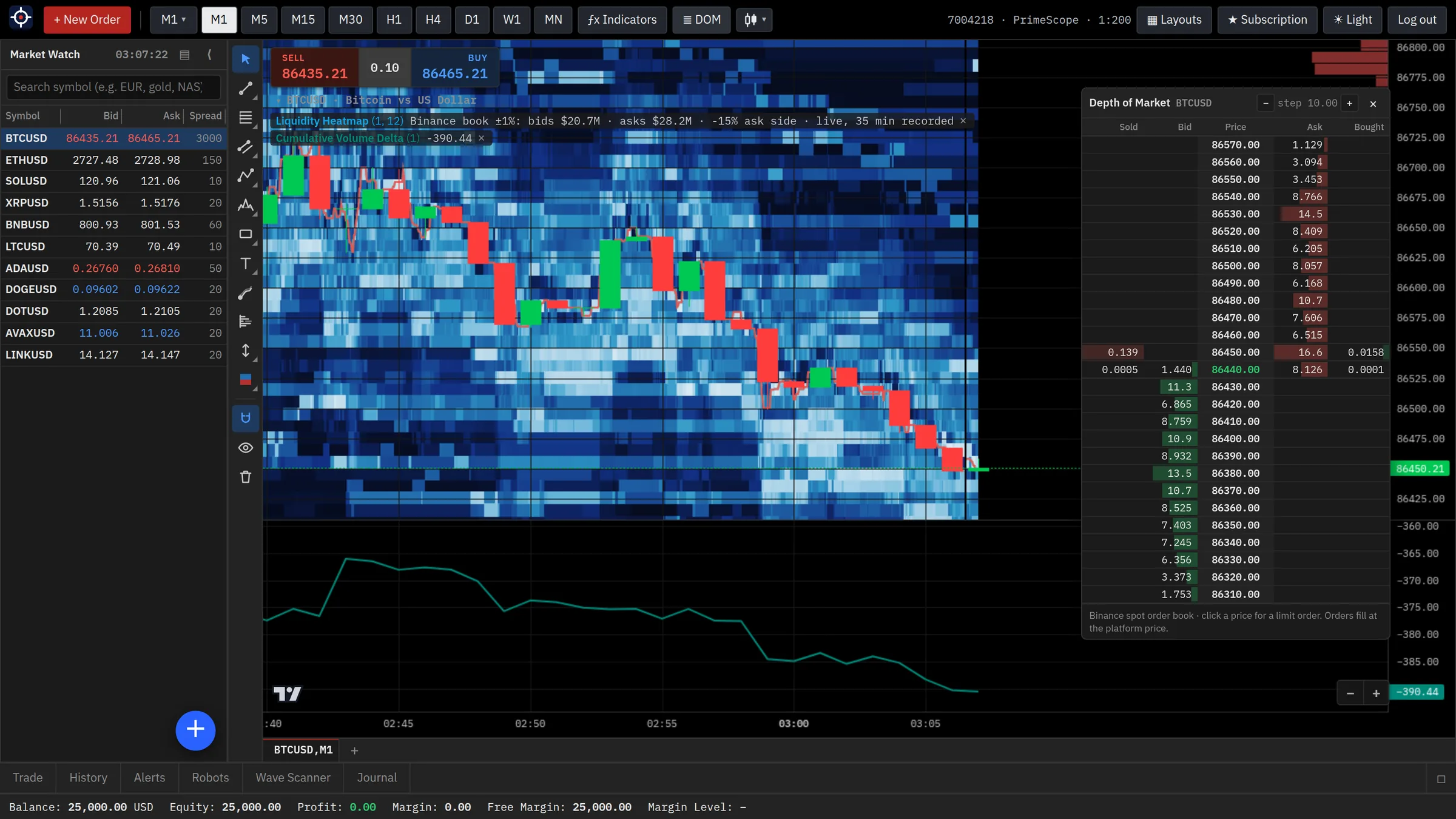
See where the liquidity sits.
The heatmap records the order book every second and paints it behind the candles. Bright bands are large resting orders; dark areas are thin liquidity. Watch how price reacts when it reaches them.
- Order book depth over time, with the best bid and ask
- Depth of Market ladder next to the chart
- Cumulative volume delta (CVD) and volume delta per candle
- Bitcoin, Ethereum and the other major crypto markets

Elliott Wave counts, drawn for you.
PrimeScope counts the waves on any symbol and timeframe, then shows what the count implies for the next move.
- Primary count plus up to three alternatives
- Subwaves and wave degrees from Supercycle to Micro
- Target zone for the next wave and the price that invalidates the count
- Manual Elliott tools with wave-rule checks and alerts

Your whole watchlist, scanned for setups.
Instead of flipping through charts, let the scanner check every symbol in your watchlist and rank what it finds.
- Any timeframe from M15 to D1
- Filter by bias, buy or sell side and minimum reward-to-risk
- Rescans every 15 minutes while PrimeScope is open
- One click sets an alert on the target or the invalidation level

See the big orders as they hit the market.
Order Flow Bubbles mark large market orders on the chart: green when buyers lift the offer, red when sellers hit the bid. The bigger the order, the bigger the bubble.
- Crypto, futures, the Nasdaq 100 and the S&P 500
- Automatic size filter (the largest 1% of orders) or your own minimum
- The last 24 hours of large orders as soon as you open the chart
- Clearest on M1 to M15, available on every timeframe

Structure, order blocks and liquidity, marked automatically.
The concepts discretionary traders draw by hand, calculated on every candle and updated as the market moves.
- Market structure: break of structure and change of character
- Order blocks (fresh or tested) and equal highs and lows
- Automatic chart patterns and RSI divergences
- Fair value gaps, volume profile, sessions and kill zones

Everything else a chart needs.
One plan. Every tool.
No contract. Cancel anytime.
PrimeScope
Everything on this page
- Elliott Waves (auto) with targets and invalidation
- Wave Scanner across your watchlist
- Liquidity heatmap, Depth of Market and CVD
- Order Flow Bubbles
- Smart Money: market structure, order blocks, liquidity
- Automatic chart patterns and RSI divergences
- Volume Profile with low-volume zones
- 130+ indicators, 60 drawing tools, alerts and layouts
Secure payment by Stripe. You are logged in right after payment, and your login details arrive by email. Cancel anytime from ★ Subscription; access stays until the end of the paid month.
Questions about PrimeScope
What do I get for $99 a month?
Every tool on this page: automatic Elliott Wave counts, the Wave Scanner, the liquidity heatmap with Depth of Market and CVD, Order Flow Bubbles, Smart Money tools, automatic chart patterns and RSI divergences, Volume Profile, plus 130+ indicators, 60 drawing tools, alerts and saved layouts.
What happens after I pay?
Your PrimeScope account is created right away and you are logged in on the next page. Your login details also arrive by email, so you can sign in from any device.
How do I cancel?
Open ★ Subscription in PrimeScope and choose Manage subscription. Cancel anytime; you keep access until the end of the month you paid for and you are not charged again.
Which markets can I analyze?
More than 100 instruments: forex, metals, energy, indices, futures, crypto, stocks and ETFs. Some instruments show delayed prices; they are marked in the watchlist. The liquidity heatmap and Depth of Market are available for crypto, where the full order book is public.
Do I need to install anything?
No. PrimeScope runs in any modern browser on Windows, macOS, Linux, tablets and phones. You can also add it to your home screen like an app.
Can I trade real money in PrimeScope?
No. PrimeScope is an analysis platform: it does not hold your money and does not send orders to a broker.
Are the wave counts and scanner results trading signals?
No. Automatic counts, scanners and patterns are analysis tools that help you plan your own trades. They do not guarantee results, and every trading decision and its risk is yours.
Get PrimeScope today.
Every tool, one plan, $99 a month. Cancel anytime.